Quickstart
Once Scribe is installed, launch it from a terminal:
This starts the system tray icon. Press Record, speak, press Stop — the transcription lands in the focused window.
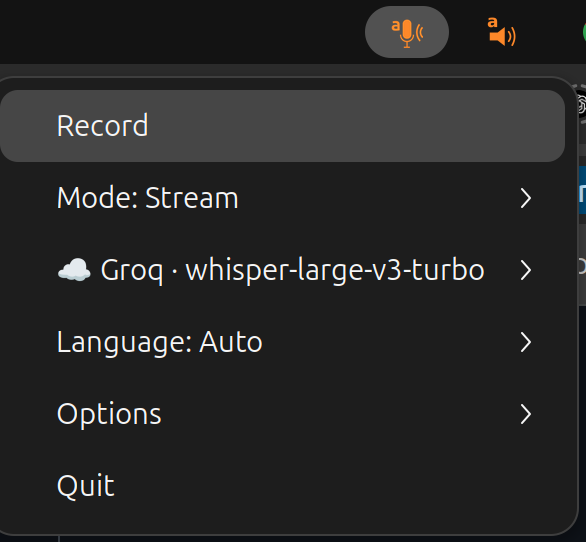
Backend auto-selection
Scribe picks the first backend whose key / dependency is present, in order
groq → openai → whisper-futo → whisper → vosk. So with
GROQ_API_KEY set, scribe is equivalent to:
See Backends for the full picture (streaming vs batch, model lists, when to pick which).
Overriding the defaults
You can override the backend / model or drop the tray entirely:
scribe --backend openai --model gpt-4o-mini-transcribe # OpenAI sweet spot
scribe --backend openai --model gpt-realtime-whisper   # OpenAI streaming
scribe --backend whisper --model small                 # local, no API key
scribe --frontend terminal                             # interactive TUI menu
scribe --record                                        # start recording immediately on launch (tray or terminal)
scribe --record --frontend terminal --mode file        # one-shot batched dictation → file
scribe --record --frontend terminal --mode file --stream  # streamed: chunks appended live as you speak
scribe --mode clipboard                                # copy to clipboard, no keystroke
scribe --mode terminal                                 # only print to stdout
scribe --mode file -o transcript.txt                   # append to a file (no keystroke / clipboard)
With --no-interactive (terminal frontend only), Scribe skips the interactive
menu and starts recording right away — handy for scripted, one-shot
transcriptions. See Output modes for where the transcript goes,
and the CLI reference for every flag.
Getting an API key
Groq is the recommended cloud backend by default — extremely fast (by a
wide margin compared to other cloud STT options, especially in Stream mode
where the per-chunk roundtrip latency dominates the perceived speed), quite
accurate, and the free tier is generous enough for everyday dictation.
Sign up at console.groq.com, create an API key
under Settings → API Keys, and export it as GROQ_API_KEY:
OpenAI with gpt-4o-mini-transcribe is another
fast option (export OPENAI_API_KEY=...), and the local Whisper / Vosk
backends need no key at all.
Biasing the recogniser
Bias the recogniser toward names, jargon, or a domain glossary with
--prompt "free text hint" and --words word1 word2 ... (each also accepts a
--prompt-file / --words-file companion):
scribe --prompt "Patient notes from a cardiology consult." \
       --words tachycardia bradycardia echocardiogram metoprolol
See Backends › Vocabulary biasing for what each backend does with them.