
Scribe
Scribe is a speech-to-text CLI and tray app that pipes transcribed text into the focused window. It supports local and cloud-based APIs, batch and streaming workflows.
- Five backends, one interface. Records from your mic and transcribes via Vosk (local, streaming), Whisper (local, batch), Whisper FUTO (local, batch — ACFT-tuned for short dictations), OpenAI (cloud, batch or streaming), or Groq (cloud, batch).
- Four ways to deliver the transcript. Paste into the focused window (default), copy to the clipboard, print to the terminal, or append to a file.
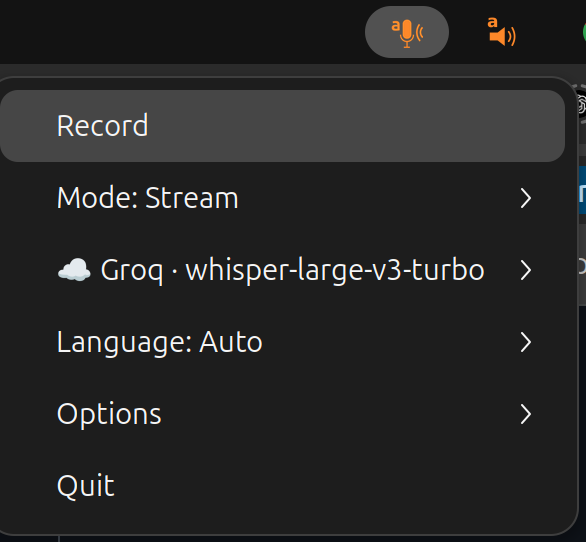
- Tray or terminal. Runs as a system tray icon with a single Record button, or as an interactive terminal TUI — same menu in both.
- Hotkey-friendly. Hooks into your desktop's keyboard shortcuts via
SIGUSR1(toggle recording) andSIGUSR2(cancel), plus built-in global hotkeys on X11 / Windows. - Cross-platform. Tested on Ubuntu (X11 and Wayland), macOS, and Windows; works under Termux for clipboard / terminal output.
Get started
- Installation — PortAudio, extras, Ubuntu / GNOME tray libs, Windows.
- Quickstart — your first dictation in a couple of minutes.
- Backends — Vosk, Whisper, Whisper FUTO, OpenAI, Groq; streaming vs batch.
- CLI reference — every
scribe --helpflag with examples.
Guides
- Backends in detail — model lists, streaming recipes, vocabulary biasing.
- Output modes — keystroke vs clipboard vs terminal vs file, Wayland /
eitype,--type-direct. - System tray & global hotkeys — menu tree, icon states,
SIGUSR1/SIGUSR2. - Desktop entry & autostart —
scribe-installlauncher integration. - CLI reference — full flag reference and fine tuning.
From the same author
A few other open-source tools I maintain.
Scientific writing & data
- texmark — write scientific articles in Markdown and convert them to journal-ready LaTeX/PDF.
- papers — command-line BibTeX bibliography and PDF library manager.
- datamanifest — declarative, reproducible dataset management. (See also the datamanifest.toml format spec and the DataManifest.jl Julia port.)
Speech to Text (dictate) and Text to Speech (read-aloud) tools
- bard — text-to-speech reader.